
Beyond OCR Accounts Payable Automation for Jobpac

Beyond OCR Accounts Payable Automation for Jobpac

Understand what a complete Jobpac invoice automation process needs beyond data extraction, especially when supplier invoices do not contain the exact Job Number, Purchase Order or Location required for processing.

Optical character recognition (OCR) is valuable because it reads visible invoice information and reduces repeated data entry. It does not, by itself, determine whether an invoice belongs to the correct Job, Purchase Order, Location or WorkID, nor does it complete the validation, exception handling, evidence and process controls required across accounts payable.

This article explains the capabilities to evaluate when considering Jobpac accounts payable automation. It also shows how WareConnect can use invoice clues, customer-approved Jobpac reference data and verified decisions to prepare cleaner Jobpac-ready data while keeping Jobpac central to the downstream finance process.

Note: Available fields, statuses, matching rules, review actions and handoff methods may vary depending on your organisation’s configuration, WorkIDs, user permissions and agreed implementation.

OCR is the starting point, not the complete process

OCR converts visible invoice text into structured data. It can capture fields such as the supplier, ABN, invoice number, date, Purchase Order reference, net amount, GST, total and line descriptions. Modern capture environments may use ABBYY FlexiCapture or configurable document AI technologies, including Google Cloud Document AI, Azure Document Intelligence and DocAI Fabric.

A wider invoice automation process must then classify the document, validate the captured values, resolve or route missing references, retain the source document, manage exceptions and complete the agreed Jobpac handoff. Accounts-payable automation extends further into searchable evidence, supplier statement reconciliation, operational visibility and support for the people responsible for the process.

Related article:
How OCR Invoice Processing Works with Jobpac

Why construction invoices are difficult to automate

Construction AP teams receive invoices from suppliers and subcontractors using different layouts, descriptions and reference formats. One invoice may show a complete Purchase Order number, while another may contain only a site address, suburb, delivery reference, contact name or project description. The same supplier may invoice several jobs or WorkIDs, and some invoices follow a Purchase Order path while others require a Job or Location-based non-PO path.

Jobpac’s accounts-payable process also requires more than registration. Current Trimble Help explains that invoice processing can involve selecting a Job or Location, linking the invoice to a Purchase Order and delivery docket where applicable, coding the invoice, creating a batch and sending it for approval. An automation design therefore needs to prepare reliable data for the correct downstream path rather than treating extraction as the end of the process.

Jobpac process context:
Electronic-Invoicing (e-invoicing) in Trimble Help

The missing Job Number, Purchase Order or Location problem

An invoice can be read accurately and still be incomplete for Jobpac. For example, the capture engine may correctly extract the supplier, invoice number, date and total, but the supplier may not have included the exact Job Number or Purchase Order number. A site address may be abbreviated, a project name may be informal, or the invoice may belong to a Location-based overhead workflow.

This is the difference between extraction accuracy and allocation accuracy. Extraction asks whether the document was read correctly. Allocation asks whether the invoice has been assigned to the correct Jobpac path using reliable business context.

Invoice clues

  • Supplier and ABN
  • Partial address or suburb
  • Description or contact
  • PO fragment
  • WorkID context

Customer-approved Jobpac data

  • Supplier Master
  • Job Number and address
  • Purchase Order details
  • Location details
  • Default supplier rules

Required decision

Suggest and verify the appropriate:

  • Purchase Order
  • Job Number
  • Location

Figure 1: Invoice clues checked against approved Jobpac reference data to support a Purchase Order, Job Number or Location decision.

What complete Jobpac invoice automation should do

A complete process should connect capture with allocation, validation, controlled review and a traceable handoff. The following workflow provides a practical evaluation model.

01

Capture and classify

Receive invoices, credit notes and statements and route the document to the correct workflow.

02

Read invoice clues

Capture supplier, ABN, dates, amounts, descriptions, addresses and available PO references.

03

Lookup Jobpac data

Check customer-approved Supplier, Job, PO, Location, WorkID and default-allocation data.

04

Suggest allocation

Suggest the likely Purchase Order, Job Number or Location path.

05

Validate controls

Apply required, format, supplier, tax, payment-detail and duplicate checks.

06

Verify and resolve

Review uncertain values, business exceptions and records requiring judgement.

07

Jobpac Ready

Confirm no unresolved Business Validation Rules Error and a valid allocation path.

08

Transfer and register

Transfer approved data and the source document using the agreed method for a Registered Pending Invoice.

Figure 2: Jobpac accounts payable automation workflow extending beyond OCR capture.

Use approved Jobpac reference data

Missing references cannot be resolved safely by guessing. A Jobpac-aligned Lookup Database gives the automation process a controlled reference point. WareConnect can populate this database using customer-approved Excel or CSV exports from Jobpac. Where endpoint access is available, a manual sync tool can refresh selected lookup information.

Direct Jobpac API access is therefore not required to deliver the core allocation and validation value. The important control is that the reference data is approved, current and appropriate to the customer environment.

Lookup data area How it supports the process
Supplier Master Confirms the creditor or supplier and can include ABN, BSB, Account Number and Account Code.
Job Number details Provides the Job Number, job address, site information and related job reference data.
Purchase Order details Provides approved order references and related supplier, job and item context.
Location details Supports Location-based overhead and non-PO allocation paths.
Default supplier rules Supports approved default Job Number or Location allocation and default supplier descriptions.
WorkID context Limits data and suggestions to the customer environment and WorkIDs the user is authorised to access.

Table 1: Jobpac-aligned lookup data used to support invoice allocation and validation.

Allocation Intelligence

Allocation Intelligence is WareConnect’s ability to combine invoice clues, customer-approved Jobpac lookup data, supplier context, WorkID context and verified human decisions to suggest the likely Purchase Order, Job Number or Location before handoff.

For example, a partial site address or suburb can be compared with Job Number and Location details. A recurring supplier description can be checked against previous verified patterns. A PO fragment can be compared with approved Purchase Order data. The result is presented as a suggestion for confirmation where review is required.

After an allocation is verified, WareConnect can remember the confirmed pattern within that customer environment and use it to improve future suggestions. This customer-specific Allocation Memory is not shared across customers.

Important: Allocation Intelligence supports a controlled suggestion and verification process. It does not mean that WareConnect blindly chooses a final allocation without approved reference data, configured rules or human review where required.

Validate before handoff

Before an invoice becomes Jobpac Ready, the process should check whether the captured and allocated data meets the required business rules. WareConnect can apply the following controls, subject to customer configuration.

Validation area What the process checks
ABN validation Checks the supplier ABN and can use live ABN registry information to identify a mismatch.
GST validation Checks tax treatment, including GST-free supplier rules where configured.
Supplier payment details Checks BSB, Account Number and related supplier payment-detail changes before handoff.
Account data Checks the supplier Account Code and other required supplier reference values.
Format rules Applies supplier-level invoice number, Purchase Order number and Job Number format rules.
Mandatory and business rules Checks required fields and configured Business Validation Rules before progression.
Duplicate checks Applies exact-match, same-creditor variation and cross-creditor duplicate logic.

Table 2: Validation areas that can be applied before Jobpac handoff.

Configurable duplicate checks

WareConnect implements three duplicate-check methods. Each method can be configured to block the invoice or display a warning for review, depending on the customer’s rules.

Duplicate check Matching approach Configured response
Exact match Creditor Code and Invoice Number. Block or warning
Same-creditor variation Creditor, Invoice Date and Net or Gross Amount. Block or warning
Cross-creditor duplicate Invoice Number and Total Amount match exactly, but the creditor is different. Block or warning

Table 3: Configurable duplicate-check methods used by WareConnect.

Duplicate and supplier-detail checks are risk controls, not a guarantee that every fraud or supplier setup issue will be detected. Records that are blocked or warned still require the appropriate user review and business decision.

Match invoices to Purchase Orders and delivery information

Jobpac supports different invoice costing paths. An invoice may be linked to a Purchase Order, linked to a Purchase Order with delivery-docket information, or coded without a Purchase Order using the appropriate Job or Location process. The automation design should preserve the references and source evidence needed for the customer’s configured Jobpac workflow.

Where an invoice includes a clear Purchase Order reference, the process can compare it with approved PO data and present the relevant order context for review. Where delivery information is part of the customer process, the selected PO and available delivery context should support the next Jobpac matching step. Where no PO applies, the invoice still needs a valid Job Number or Location allocation before handoff.

Related Jobpac guidance:
Code an Invoice Linked to a Purchase Order
and
Code an Invoice Linked to a Purchase Order with a Delivery Docket

Keep people in control of uncertain records

High automation is appropriate when the captured data, allocation and validation rules pass. Human oversight remains important when the invoice is unclear, the business context is unusual or the decision requires judgement.

WareConnect Bill View provides a controlled workspace for reviewing the source document, captured fields, allocation suggestions, validation messages, duplicate indicators, payment-detail alerts, comments and audit history. Users can correct values and confirm the Purchase Order, Job Number or Location path before the record continues.

The verification model can be customer-managed, DataDevice-managed or hybrid, depending on the agreed operating process. The objective is not to remove control, but to direct human attention to the records that genuinely need it.

Manage exceptions and failed handoffs

A reliable AP process keeps uncertain, invalid and failed records visible. WareConnect uses operational queues and statuses so that users can see why a document has stopped and what action is required.

Status Meaning Typical next action
Verification Field, allocation or validation confirmation is required. Review the document and confirm or correct the relevant value.
Review Customer-side business judgement, escalation or approval input is required. Complete the required business review.
Exceptions A duplicate, mismatch, validation or business-rule issue prevents safe progression. Resolve the issue or follow the agreed exception process.
Jobpac Ready No unresolved Business Validation Rules Error remains and the invoice is allocated to a Job, Purchase Order or Location. Proceed with the agreed Jobpac handoff.
Posted to Jobpac Approved invoice data and the source document have been transferred using the agreed integration method. Confirm the Jobpac result or investigate a reported handoff issue.
Import Failed The document could not be imported or classified correctly. Review the document, apply the required fix and reprocess where appropriate.

Table 4: WareConnect statuses used to keep invoice processing issues visible and actionable.

After an accepted handoff, the invoice becomes a Registered Pending Invoice in Jobpac. Registration is the Jobpac outcome; it does not mean that all later Jobpac coding, matching, batching, approval or posting steps are complete.

Retain evidence and reconcile supplier statements

Accounts-payable automation should make invoice evidence easier to find after capture. WareConnect Repository can retain invoices, credit notes, statements, supporting documents, captured data, comments, validation history, audit history and processing status. Users can search using information such as supplier, invoice number, Job Number, Purchase Order, Location, WorkID, date, amount, status, duplicate result, payment-detail mismatch and export status.

WareConnect also includes Supplier Statement Matching in the base commercial offer. Statement Matching compares supplier statement lines with processed invoices and credit notes to identify missing invoices, duplicate invoices, amount mismatches, missing credit notes, aged balance differences and supplier follow-up items. This extends the process beyond invoice capture into reconciliation and payment-run preparation.

Measure the AP process

Process owners need visibility into the complete workflow, not only extraction accuracy. A Process Owner Dashboard can show where documents are moving, where exceptions are accumulating and which suppliers, WorkIDs or teams require attention.

Visibility area What it helps the process owner understand
Live processing pipeline Volumes across ingestion, classification, extraction, validation, verification, review, exceptions, Jobpac Ready, Posted to Jobpac and Import Failed.
Exception and bottleneck patterns Which validation, allocation, supplier or handoff issues are creating repeat work.
Cycle time and throughput How quickly documents move through the process and where delays occur.
Team and WorkID workload How volumes and review tasks are distributed across users, teams and authorised WorkIDs.
Supplier risk and page consumption Which suppliers require repeated correction and how document-processing activity is tracking against the service arrangement.

Table 5: AP process visibility areas for Jobpac invoice automation.

Prepare Jobpac-ready data

WareConnect does not replace Jobpac. Jobpac remains the downstream construction finance system. WareConnect prepares and controls invoice and credit note data before handoff so that the record reaches Jobpac with clearer allocation, stronger validation and a traceable source document.

For this workflow, an invoice is Jobpac Ready when it has no unresolved Business Validation Rules Error and has been allocated to the appropriate Job, Purchase Order or Location. The statuses should be understood separately:

Jobpac Ready

The WareConnect record has met the required business-validation and allocation conditions for handoff.

Posted to Jobpac

The approved invoice data and source document have been transferred using the agreed integration method.

Registered Pending Invoice

Jobpac has accepted the invoice into its Pending Invoice process for the next applicable Jobpac stage.

Jobpac AP automation evaluation checklist

Use the following questions when comparing or modernising a Jobpac invoice and accounts-payable automation solution.

  • Can the solution receive supplier invoices and credit notes through the agreed intake channels and retain the original document?
  • Can it capture the fields your Jobpac process actually requires, rather than only generic invoice fields?
  • What happens when the Job Number, Purchase Order number or Location is absent, incomplete or unclear?
  • Can it use customer-approved Supplier, Job, Purchase Order, Location, cost and WorkID information?
  • Can it support the required Purchase Order, line, delivery or non-PO process without forcing one workflow on every invoice?
  • Can it check required values, supplier information, tax treatment, payment details, Account Codes, formats and duplicates before handoff?
  • Can uncertain or high-risk records be reviewed without losing the document, comments or audit history?
  • Are failed validations, missing values, exceptions and handoff issues visible and traceable?
  • Can users find the invoice and processing evidence without searching email folders or disconnected document stores?
  • Can the process identify missing invoices, credit notes and supplier statement discrepancies?
  • Can process owners see volumes, bottlenecks, supplier patterns and team or WorkID workload?
  • Is the approved invoice data and source document transferred using an agreed, supported and testable method?
  • Can the solution respect WorkIDs, roles, supplier rules and customer-specific workflows?
  • Who resolves capture, allocation, validation and integration exceptions under the operating model?
Capture

Document intake, classification, extraction and source retention.

Allocation

Job, Purchase Order, Location and WorkID context.

Controls

Validation, duplicates, review and exceptions.

Matching

PO, delivery and non-PO workflow support.

Evidence

Repository, comments and audit history.

Reconciliation

Supplier statements, missing invoices and credit notes.

Visibility

Pipeline, bottlenecks, workload and supplier patterns.

Handoff

Supported transfer and Registered Pending Invoice outcome.

Figure 3: Core areas to evaluate in Jobpac invoice and accounts-payable automation.

How WareConnect supports the process

WareConnect for Jobpac brings the wider process together without replacing Jobpac. It combines document capture, Allocation Intelligence, a Jobpac-aligned Lookup Database, customer-specific Allocation Memory, Bill View verification, validation and duplicate controls, operational queues, Repository, included Supplier Statement Matching and Process Owner Dashboard visibility.

WareConnect supports unlimited Jobpac WorkIDs, with access to specific WorkIDs or all WorkIDs controlled by the customer administrator. The capture layer can support ABBYY FlexiCapture and configurable document AI technologies, including Google Cloud Document AI, Azure Document Intelligence and DocAI Fabric.

WareConnect for Jobpac is available for demonstration and implementation. The approved invoice data and source document are transferred to Jobpac using the agreed integration method.

Frequently asked questions

Is Jobpac invoice automation the same as OCR?

No. OCR reads visible invoice information. Invoice automation adds classification, allocation, validation, controlled review, exception handling and system handoff. Accounts-payable automation extends further into evidence, reconciliation and process visibility.

What happens when an invoice has no Job Number?

WareConnect can use available invoice clues, customer-approved Jobpac reference data, supplier context, WorkID context and verified history to suggest the likely Purchase Order, Job Number or Location. The suggested allocation is confirmed where review is required.

Does WareConnect replace Jobpac?

No. Jobpac remains the downstream construction finance system. WareConnect prepares, validates and controls the invoice data and source document before the agreed Jobpac handoff.

Does WareConnect require direct Jobpac API access?

No. WareConnect can use a Jobpac-aligned Lookup Database populated from customer-approved Excel or CSV exports. Where endpoint access is available, a manual sync tool can refresh selected lookup data.

Can WareConnect support multiple Jobpac WorkIDs?

Yes. WareConnect supports unlimited Jobpac WorkIDs. The customer administrator controls whether a user can access specific WorkIDs or all WorkIDs.

How are duplicate invoices handled?

WareConnect implements exact-match, same-creditor variation and cross-creditor duplicate checks. Each check can be configured to block the invoice or display a warning for review.

Is Supplier Statement Matching included?

Yes. Supplier Statement Matching is included in the base commercial offer. It helps identify missing invoices, duplicate invoices, amount mismatches, missing credit notes, aged balance differences and supplier follow-up items.

What does Jobpac-ready data mean?

An invoice is Jobpac Ready when it has no unresolved Business Validation Rules Error and has been allocated to the appropriate Job, Purchase Order or Location. The approved data and source document can then be transferred using the agreed integration method.

What happens after the invoice is transferred to Jobpac?

After Jobpac accepts the invoice, it becomes a Registered Pending Invoice for the next applicable Jobpac processing stage. Later coding, matching, batching, approval or posting steps depend on the Jobpac workflow and customer configuration.

Related resources

See WareConnect for Jobpac in action

See how Allocation Intelligence, Jobpac-approved lookup data, validation, controlled review and Jobpac-ready handoff can reduce double handling in your invoice process.



Contact DataDevice to arrange a demonstration

How OCR Invoice Processing Works with Jobpac

How OCR Invoice Processing Works with Jobpac

Understand how an external OCR or document capture process reads supplier invoices, prepares approved invoice data and the source document for Jobpac, and supports the creation of a Registered Pending Invoice.

Optical character recognition (OCR) can reduce manual invoice entry by reading visible information from supplier invoices and converting it into structured data. For Jobpac users, an external OCR or document capture process can prepare approved invoice data and the source document for transfer to Jobpac, where the invoice can become a Registered Pending Invoice.

This article explains the workflow, what happens when validation fails, and why OCR alone cannot resolve information that is missing or unclear on the invoice.

Note: Available intake channels, validation rules, review steps and Jobpac handoff methods depend on the customer environment and agreed implementation. The principles in this article apply broadly, but the exact workflow may vary.

What OCR means in invoice processing

OCR is the technology used to recognise printed or digital text in an invoice and convert selected values into machine-readable data. An invoice capture solution may use OCR together with document classification, data extraction, validation and verification tools.

For a supplier invoice, the captured values may include the supplier name, ABN, invoice number, invoice date, Purchase Order reference, net amount, GST, total amount and selected line information. The exact fields depend on the document layout, capture configuration and information visible on the invoice.

Recognition is not the same as business validation. OCR may correctly read a value without knowing whether that value is valid for the supplier, WorkID, Purchase Order, Job Number or Location used in Jobpac. It also cannot extract a reference that the supplier did not include.

How invoices enter an OCR workflow

Supplier invoices can enter an external capture process through an agreed intake channel. Depending on the implementation, this may include an accounts-payable mailbox, document upload, scanned PDF or supported image file. The capture process should retain the source document so users can compare extracted values with the invoice when review is required.

A well-designed intake process also separates invoices from unrelated attachments and supporting documents. Classification determines the document type and sends it to the appropriate processing path before field extraction begins.

OCR invoice processing workflow

01

Receive

Invoice and attachments enter the agreed intake channel.

02

Classify

The document is identified as an invoice or another document type.

03

Extract

Visible invoice fields are converted into structured data.

04

Validate

Confidence, format and available reference checks are applied.

05

Verify

Uncertain or invalid values are reviewed against the source document.

06

Transfer

Approved data and the source document are sent using the agreed method.

07

Register

The accepted record becomes a Registered Pending Invoice in Jobpac.

Figure 1: OCR invoice processing workflow from supplier invoice intake to a Jobpac Registered Pending Invoice.

Capture, classification and data extraction

The capture stage creates a usable document image or reads the digital invoice file. Classification then identifies whether the document is an invoice, credit note, supplier statement or another document type. After classification, the extraction engine reads the configured fields and presents them as structured data.

Modern capture environments may use ABBYY FlexiCapture or configurable document AI technologies, including Google Cloud Document AI, Azure Document Intelligence and DocAI Fabric. The capture technology can vary without changing the basic requirement: the extracted values must be checked, approved and transferred in a format the Jobpac process can accept.

DataDevice describes the common capture stages as input, classification, recognition, data extraction, verification and export. These stages provide a useful foundation, but they do not by themselves determine whether an invoice is complete for Jobpac processing.

Validation and human verification

Validation checks whether extracted information meets the configured rules and available reference data. A capture solution may check whether a required field is present, whether a value follows the expected format, whether totals balance, or whether an extracted supplier or Purchase Order can be found in the available data.

Confidence scores can also identify values that the capture engine could not read with sufficient certainty. These values should be compared with the source document rather than accepted automatically.

Human verification is a control, not a failure of automation. It allows uncertain values, unusual layouts and business exceptions to be checked before incorrect data moves further into the accounts-payable process.

How approved invoice data reaches Jobpac

Jobpac documentation describes external OCR systems reading incoming invoices and preparing invoice data and the scanned image for Jobpac. In a configured WareConnect workflow, the approved invoice data and source document are transferred to Jobpac using the agreed integration method.

The exact handoff method depends on the customer environment and implementation. The important outcome is that Jobpac receives the approved record and source document in the expected form, rather than users having to re-enter the same invoice information manually.

After Jobpac accepts the information, the invoice can become a Registered Pending Invoice. It is then available for the next applicable Jobpac processing stage, which may include further coding, matching, approval or posting depending on the organisation’s configuration.

What happens when validation fails

Trimble’s Jobpac Help explains that an invoice that fails validation during the OCR intake process can be displayed in the e-invoice Edit Screen. A user can review the invoice, correct the relevant information and then register it as a Pending Invoice.

The specific error and permitted correction depend on the Jobpac configuration and the data supplied by the external system. A failed validation should therefore remain visible and traceable rather than being silently ignored or replaced with an unconfirmed value.

Related Jobpac source:
OCR Entry of Pending Invoices in Trimble Help

What OCR does well

OCR is valuable when the objective is to reduce repeated typing and create a consistent starting point for invoice processing. When the invoice is readable and the capture configuration is suitable, OCR can:

  • Capture visible invoice fields into a structured format.
  • Reduce repeated manual re-keying of supplier invoice information.
  • Retain the source document alongside the captured data.
  • Apply consistent field and format checks.
  • Route uncertain values for verification.
  • Prepare approved data for transfer to Jobpac.

These benefits can make invoice intake more consistent and easier to review. They do not guarantee that every invoice contains the business references needed for correct allocation in Jobpac.

Where OCR reaches its limit

OCR can only read information that appears on the invoice and can be recognised from the document. It cannot extract an exact Job Number, Purchase Order number or Location when the supplier has omitted it. It may also read a partial site address, project description or contact name without knowing which Jobpac record the clue relates to.

This creates an important distinction between extraction accuracy and allocation accuracy. An invoice can be read accurately and still be incomplete for the Jobpac process.
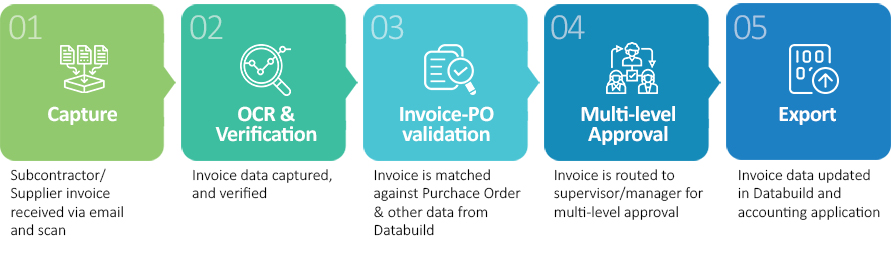
Visible on the invoice

  • Supplier name and ABN
  • Invoice number and date
  • Net, GST and total
  • Description or site clue

May be missing or unclear

  • Exact Job Number
  • Valid Purchase Order
  • Correct Location
  • Required WorkID context

Figure 2: OCR can capture visible invoice values, but a wider process is required to resolve missing or ambiguous Jobpac references.

OCR, invoice automation and accounts-payable automation

The terms OCR, invoice automation and accounts-payable automation are related, but they describe different levels of capability.

Capability level What it does What it does not guarantee
OCR capture Reads visible invoice text and converts selected values into structured data. That the invoice contains every Jobpac reference required for processing.
Invoice automation Adds classification, validation, verification, routing and system handoff. That every missing or ambiguous allocation can be resolved without approved reference data or business judgement.
Accounts-payable automation Coordinates the broader process, controls, exceptions, evidence, reconciliation and reporting. That every customer will use the same workflow, fields or approval rules.

Table 1: Difference between OCR capture, invoice automation and accounts-payable automation.

What to check when selecting Jobpac OCR

An OCR solution should be assessed as part of the complete invoice process, not only by how many fields it can read. Before selecting or modernising a Jobpac OCR approach, confirm the following:

  • Which invoice formats and intake channels are supported in the proposed implementation?
  • How are invoices separated from credit notes, statements and supporting documents?
  • Which fields are extracted, and how are supplier-specific layouts handled?
  • Is the source document retained and transferred with the approved invoice data?
  • Which confidence, format and reference checks are performed before handoff?
  • How are uncertain values presented for human verification?
  • What happens when Jobpac validation fails, and where can the invoice be corrected?
  • How does the solution confirm that a Registered Pending Invoice was created?
  • What happens when the invoice does not contain the correct Job Number, Purchase Order or Location?
  • Who owns monitoring, support, capture changes and integration issue resolution?
Important: Do not evaluate OCR accuracy in isolation. Confirm how the complete process handles missing references, validation failures, correction, source-document transfer and successful registration in Jobpac.

Frequently asked questions

Does Jobpac include OCR?

Jobpac documentation describes external OCR systems reading incoming invoices and preparing the invoice data and scanned image for Jobpac. This means the recognition and extraction process may occur in an external capture platform, while Jobpac receives the prepared record for further processing.

What is a Registered Pending Invoice in Jobpac?

A Registered Pending Invoice is an invoice record that has been accepted into the Jobpac Pending Invoice process for the next applicable processing stage. Registration does not necessarily mean that all later coding, matching, approval or posting steps are complete.

What happens when an OCR invoice fails validation?

Trimble’s Jobpac Help states that a failed OCR invoice can be displayed in the e-invoice Edit Screen. The user can review and correct the relevant information before the invoice is registered as a Pending Invoice.

Can OCR find a Job Number that is not on the invoice?

No. OCR can read the text and clues present on the invoice, but it cannot extract a Job Number that the supplier did not provide. A wider invoice automation process may use approved Jobpac reference data and controlled review to suggest or confirm the correct allocation.

Is OCR the same as invoice automation?

No. OCR is the capture and recognition component. Invoice automation adds classification, validation, verification, workflow and system handoff. Accounts-payable automation extends further into controls, exceptions, evidence, reconciliation and reporting.

Which capture technologies can be used?

The capture technology depends on the agreed implementation. WareConnect can support ABBYY FlexiCapture and configurable document AI technologies, including Google Cloud Document AI, Azure Document Intelligence and DocAI Fabric. The capture engine should remain separate from the business rules, validation and Jobpac workflow wherever practical.

Next step: move beyond extraction

OCR creates a structured starting point for Jobpac invoice processing. The next challenge is resolving missing or ambiguous references, applying business controls, managing exceptions and preparing complete Jobpac-ready data without unnecessary double handling.

Continue the Jobpac automation series

Read Beyond OCR: Accounts Payable Automation for Jobpac to understand allocation, validation, exception handling and Jobpac-ready data.


Read Beyond OCR: Accounts Payable Automation for Jobpac

Related resources

See WareConnect for Jobpac in action

WareConnect for Jobpac is available for demonstration and implementation. See how OCR-assisted capture, controlled validation and Jobpac-ready processing can support your invoice workflow.


Contact DataDevice to arrange a demonstration

How WareConnect Transforms Purchase to Pay (P2P) Automation for Maximum Efficiency

How WareConnect Transforms Purchase to Pay (P2P) Automation for Maximum Efficiency

In today’s fast-paced business environment, organizations are continually seeking ways to enhance efficiency, reduce costs, and maintain a competitive edge. One critical area ripe for improvement is the Purchase to Pay (P2P) process, which encompasses the entire procurement cycle—from purchasing goods and services to processing supplier payments. Traditional manual P2P processes are often fraught with challenges, including delayed approvals, data entry errors, and lack of real-time budget visibility. These issues can lead to financial discrepancies, strained supplier relationships, and missed opportunities for cost savings.

Recognizing these challenges, forward-thinking organizations are turning to automation solutions to streamline their P2P processes. One such solution is WareConnect, developed by DataDevice, which offers comprehensive automation tailored to integrate seamlessly with Microsoft Dynamics 365 Finance.

Understanding the Purchase to Pay Process

The P2P process is a vital component of an organization’s operations, involving several key stages:

  1. Purchase Requisition: Employees identify the need for goods or services and submit a purchase request.
  2. Purchase Order (PO) Creation: Upon approval of the requisition, a formal PO is generated and sent to the supplier.
  3. Goods Receipt: The organization receives the goods or services and verifies them against the PO.
  4. Invoice Processing: The supplier submits an invoice, which is matched against the PO and goods receipt for accuracy.
  5. Payment Processing: After validation, payment is made to the supplier as per agreed terms.

Each of these stages, when handled manually, can introduce delays and errors, impacting the organization’s financial health and operational efficiency.


The Case for Automation

Automating the P2P process offers numerous benefits:

  • Efficiency Gains: Automation reduces manual data entry, accelerates approval workflows, and minimizes processing times.
  • Enhanced Accuracy: By eliminating manual intervention, the risk of errors in data entry and processing is significantly reduced.
  • Real-Time Visibility: Organizations gain instant access to procurement data, facilitating better budget management and decision-making.
  • Cost Savings: Streamlined processes lead to reduced operational costs and the ability to capitalize on early payment discounts.


Introducing WareConnect

WareConnect is a robust automation solution designed to optimize the P2P process.
Key features include:

  • Purchase Request Module: Allows users to create and submit purchase requests with automated budget allocation based on supplier, cost center, and item number.
  • Automated Approval Workflows: Ensures purchase requests and invoices are routed through predefined approval hierarchies, enhancing compliance and control.
  • Invoice Management: Automates invoice import, validation, and matching against POs and goods receipts, reducing manual effort and errors.
  • Real-Time Integration: Seamlessly integrates with Microsoft Dynamics 365, providing up-to-date financial data and budget insights.


Real-World Impact: Collingwood Football Club’s Success Story

A prime example of WareConnect’s effectiveness is its implementation at the Collingwood Football Club (CFC). CFC faced challenges with manual procurement and expense processes, leading to inefficiencies and financial oversight issues. By adopting WareConnect, CFC achieved:

  • 85% Reduction in Procurement Approval Time: Streamlined workflows enabled faster decision-making.
  • Automated Invoice Processing: Reduced manual data entry and accelerated payment cycles.
  • Real-Time Budget Validation: Enhanced financial control and prevented overspending.

This transformation not only improved operational efficiency but also strengthened supplier relationships and provided CFC with greater financial oversight.
 

Conclusion
Incorporating automation into the Purchase to Pay process is no longer a luxury but a necessity for organizations aiming to thrive in today’s competitive landscape. Solutions like WareConnect offer a pathway to enhanced efficiency, accuracy, and financial control. By embracing such technologies, businesses can focus on strategic initiatives, drive growth, and maintain a robust financial foundation.
For organizations seeking to modernize their procurement and financial workflows, exploring the capabilities of WareConnect could be a transformative step toward achieving operational excellence.

Streamlining EFT Bank Upload Summary Report Process for Enhanced Efficiency

Streamlining EFT Bank Upload Summary Report Process for Enhanced Efficiency

In today’s fast-paced digital world, businesses are constantly seeking ways to streamline their operations and enhance productivity. One area that often involves manual effort and potential errors is the creation and approval process of the EFT Bank Upload Summary Report. WareConnect, a solution from DataDevice Pty, by embracing digital solutions, such as digitally compiling a summary report of open invoices, submitting it for electronic approval, automatically marking invoices as paid, and generating cheques with email remittance advice, organizations has simplified and optimized financial workflows.

Traditionally, the creation of the EFT Bank Upload Summary Report involves manual gathering and compilation of open invoices to be paid. This manual process is not only time-consuming but also prone to errors. By digitizing this process, organizations can significantly improve efficiency and accuracy.

Implementing WareConnect, businesses can compile a summary report of open invoices to be paid in the bank via an ABA file upload. This digital compilation pulls invoice details directly from the accounting or invoicing software, ensuring up-to-date and accurate information. The report includes essential details such as payment amounts, due dates, and vendor information, all conveniently accessible in a centralized platform.

The next step in streamlining the process is implementing an electronic approval system. Instead of relying on manual signatures or physical documents, this digital workflow allows authorized personnel to review and approve the summary report electronically. Approvers can access the report online, examine the details, and provide their approval with just a few clicks. This eliminates the need for paper-based approval processes and enables faster decision-making.

Once the summary report has received electronic approval, the system automates the invoice payment process. By generating ABA files compatible with the bank’s upload requirements, organizations can seamlessly transfer the payment information for processing. The system maps the relevant invoice data to the appropriate fields in the ABA file, ensuring accuracy during the upload.

Simultaneously, as the payments are confirmed by the bank, the system automatically marks the corresponding invoices as paid in the accounting software. This eliminates the need for manual entry and reduces the risk of errors in recording payments.

For payments processed through EFT, the system can auto-create cheques with all the necessary payment details. This automation saves time and effort in generating and printing physical cheques manually.

In addition to cheques, the system also generates email remittance advice. These electronic notifications contain comprehensive payment information, invoice references, and any additional relevant details. By emailing the remittance advice directly to the vendors, businesses can improve communication, reduce queries, and enhance transparency.

In conclusion, by simplifying and digitizing the EFT Bank Upload Summary Report process, organizations can streamline financial workflows and improve efficiency.

To know more…book a demo for “WareConnect for Databuild”, by calling us at +61 (02) 8377 6448


Benefits of NDIS invoice processing automation for Plan Managers

Benefits of NDIS invoice processing automation for Plan Managers

Emma Thompson, the British actress, and screenwriter said “Being disabled should not mean being disqualified from having access to every aspect of life.” In this spirit, it is only appropriate that, in the year 2013, the Australian government established The National Disability Insurance Scheme (NDIS), which is run by the National Disability Insurance Agency (NDIA), funding reasonable and necessary supports and services that relate to a person’s disability to help them achieve their goals.

Since you, as Plan Manager, are already a part of NDIS you know all that is to be known about the NDIS program. So, let’s instead look at the issues faced by Plan Managers while processing NDIS invoices submitted to them by Plan-managed participants. We at DataDevice Pty, an Australian company, based in Sydney, have been working closely with Plan Managers – My Plan Manager our client, and with Windgap Foundation Limited (currently in final talks with them). We found that the four major bottlenecks, taking up valuable time and resources are:

Let’s take a look at each.

The first issue of manually entering data, resulting in errors, can be resolved by opting for an automatic data extraction application like Abby Flexicapture. This requires setting up the application and DataDevice, having been a Platinum partner of Abbyy for the last 15 years, can help you achieve that. Also, some vendor invoices need to be “trained” to correctly extract the required data. We offer these services too.

The second, Verification of invoice data, can be sorted by employing resources in the form of Verification Operators who verify the extracted invoice data and correct it wherever necessary before submitting the same to the myplace provider portal. Also, to find which vendor invoices that need training, verification is necessary.

Eventually, if you enter NDIS invoice data manually or use any data extraction application, verification of invoice data is a must to avoid rejection of the invoice thus introducing a delay in payment to the vendor. To make verification accurate and economical, DataDevice offers Verification Operators as a Service (VOaaS). The flow can be depicted graphically,

We closely follow NDIS instructions and those you gave to verify and correct the NDIS invoices. The typical NDIS Invoice Data Extraction and Verification fields are:

  • provider’s ABN

  • provider’s NDIS business name

  • participant NDIS Number

  • participant Name

  • invoice Number

  • invoice Date

  • amount Inc GST

  • GST Amount

And for each Service provided (Table Line Items)

  • support Start Date & Support End Date

  • support Code listed in the NDIS Support Catalogue

  • support Description

  • quantity

  • unit Price

  • total Invoice Amount

  • GST component if applicable

Also, the third, Validation, is also taken care of by Verification Operators. They verify the mandatory fields mentioned below so that you as Plan Manager can take corrective actions:

  • has the NDIS plan expired or is active?

  • is the price correct and the hourly breakdown provided?

  • are there enough funds in the NDIS plan?

  • is a correct start and end date provided in the invoice?

  • was the service provided under a single plan?

  • are any mandatory details missing?

And finally, the fourth, Record keeping is very essential to prove that your claims for the support delivered to NDIS participants are correct. The following records need to be maintained:

  • invoices

  • service agreements

  • other documents that can validate the claim for the support provided

Providing this documentation allows NDIS to verify the quantity, type, and duration of the support delivered if you are selected for a compliance review.

DataDevice can help you by providing a repository for all the records, on your server, with an easy Search and Retrieve facility.

Further, as you are aware that the NDIS has stringent rules and regulations in place around invoices. And, Plan Managers are responsible for ensuring that claims for payment are complete, truthful, and accurate.

Towards this end, our Verification Operators diligently review each claim for compliance and apply corrections wherever necessary, before they are submitted to the myplace provider portal. This means that the vendor payment period is optimised with less likelihood of any claim being rejected.

Using our Verification Operators, you:

  • ensure prompt Vendor payments
  • assure that Participants need not worry about their budgets but focus on their goals
  • save on OPEX (Operating Expenditure)
  • save Time
  • save Money
  • outsource Hiring
  • outsource Training
  • save on HR activities.

To achieve the above, you can outsource all the four above-mentioned tasks to DataDevice. Keeping data security as the highest priority and fully complying with the NDIS Act, Statutory Rules, and NDIS Code of Conduct, here is how our team of Verification Operators is built and managed.

Onboarding Process

We source potential candidates and as part of the interview process put them through a practical test. Next, we get the worker clearances completed as advised by the Plan Manager and get the Police Character Certificate (PCC).

Once the candidate is selected, we provide them with a laptop, install licensed Software & Secure Access, set up DataDevice’s standard tools and set up tools/systems specific to you.

As part of induction, we provide Client Orientation and Client specific training so that he is ready to take up your tasks. After this, the candidate goes live by starting to process the NDIS invoices and related tasks.

Powerful Access Security

Security tech like Cisco Duo is used to limit access to passwords, other important credentials, and file access. We Protect your data with simple yet powerful access security.

Our modern access security is designed to safeguard all users, devices, and applications —so you can remain assured about the security of your application and data.

We lay the foundation for your zero-trust journey with multi-factor authentication, dynamic device trust, adaptive authentication, and secure single sign-on for every user and device. This makes work from anywhere possible with perimeter-less workforce protection and worldwide secure access.

Pod-based efficient Workforce Management

The total workforce is divided into a manageable number of employees called Pod. Every Pod has a dedicated Supervisor who trains, answers queries, motivates, and manages the employees in the Pod. Also, a Manager manages all the Supervisors and talks to the client in real-time.

We also maintain a trained “Bench” Pod. This Pod remains on standby but swings into action as soon as some employee from a regular Pod is sick or has to remain away from work for any reason. The best part is that we do not charge you for this “Bench” Pod! We absorb this cost so that your work continues smoothly without break.

Employee benefits

Every month the Pod meets, in person, to have fun and strengthen the bond between themselves and the Supervisors.

Also, every month one Most Valuable Player (MVP) is nominated from each Pod. To be worthy of becoming an MVP the employee has to achieve error-free targets. The MVP is rewarded with Amazon Gift Vouchers. It is considered a matter of pride to be nominated as an MVP!

We understand that at times the job can be very stressful. Therefore, we arrange monthly Yoga Sessions as part of Stress Management.

To sum up, the below diagram depicts the NDIS invoice processing automation for Plan Managers:

For more information and to book a demo of this solution, Contact us at +61 (02) 8377 6448

How, during the pandemic, Khan’s SUPA IGA Supermarket group managed 600% rise in workload with the same number of staff

How, during the pandemic, Khan’s SUPA IGA Supermarket group managed 600% rise in workload with the same number of staff

Faisal R. Bajwa, group controller manager at Khan’s SUPA IGA Supermarket Group faced an ongoing issue of submitting and approving invoices between store locations and its head office as it required a substantial investment in resources. Also, collating weekly documents and their storage was a tedious manual process that lacked transparency and represented a significant cost per store.

Faisal, reached out to DataDevice Pty, a software house, with these issues.

The software house appointed their business analyst to gain an in-depth knowledge of the supermarkets current as is process and create scope of works. The study revealed that Laserfiche was the right solution to resolve the issues. Having expertise and experience in Laserfiche products, DataDevice demonstrated Laserfiche solution to Khan’s SUPA IGA Supermarket Group and later helped carry out user acceptance testing.

On acceptance, DataDevice began implementation of Laserfiche at Khan’s SUPA IGA Supermarket Group, which currently operates 11 supermarket locations across NSW, Australia, providing a wide range of products and value-added services at each location and staffing over 800 people across all stores. Laserfiche products, were used to implement an automated solution for invoice processing, reconciling the invoices by matching them with the appropriate statements, storage of documents and generating reports in order to optimize company resources and increase transparency. DataDevice imparted the required training to IGA Khan’s employees to quickly get them started using Laserfiche solution.

Bajwa is of the opinion that using Laserfiche, important documents are now quickly uploaded and delivered to the head office, significantly reducing labor costs and paperwork, and allowing them to make prompt decisions and improve key business relationships.

During the COVID-19 pandemic, Khan’s SUPA IGA’s decision to implement Laserfiche was instrumental in enabling the company to manage a 600% increase in work volume – compared to the same period last year — with the same amount of staff in a highly efficient and cost effective manner.

But, what exactly was involved in this implementation?

Implemented invoice collection, approval and storage workflow, saving time and money

Due to lack of digital document and records management system, it took a 10 hour drive to deliver paper invoices from remote store branches to the Head office, on a regular basis. On arrival, the paper invoices had to be sorted and submitted for review and approval to different members of the finance team. These challenges represented a huge investment in time and company resources, and also resulted in a lack of transparency. Thus the manual invoice approval system was inefficient and tedious.

DataDevice assisted Khan’s SUPA IGA to recognize an opportunity for digitally transforming the creditor invoice approval process, and to decide to implement Laserfiche enterprise content management (ECM) system for its expansive document storage and workflow modelling capabilities.

The ability to upload and store invoices in one central location has helped the finance team and auditors to easily search and instantly access invoices and related information.
Later, Bajwa said that Laserfiche could not only hold documents, but the workflow modelling tool and the ability to use data and scripting to generate reports, as demonstrated by DataDevice, was a huge advantage.

Implemented digitisation of store inventory, reducing the time spent in stock-taking and helped control purchases

Implemented digitisation of store inventory, reducing the time spent in stock-taking and helped control purchases

With fully digitised and automated invoice approval process, after the finance manager performs a general review of received invoices, they are scanned into the Laserfiche repository. A Laserfiche Workflow completes the invoice approval process and exports to a third-party accounting program called Attache.
As all invoices are processed in real time as they arrive at each store location, Khan’s SUPA IGA now has a more accurate view of products purchased and their quantity. This has allowed the organization to reduce the frequency of in-store inventory, and has resolved issues of over-purchasing.


Implemented reporting feature of Laserfiche rendering greater visibility and control of company finances and resources

Laserfiche analytics has many reporting features like estimating time to complete future tasks, Identifying inefficiencies and hidden opportunities, profit and loss (P&L) reports and many others. These features have served the organization to have better control over company finances, to streamline resource allocation and to control in-store operations.


Implemented employee safety measures during the COVID-19 outbreak, avoiding loss of work time due to sickness

The company’s decision to digitise documents and implement touchless invoice approval process and statement matching has improved occupational health and safety standards during the COVID-19 pandemic. Since all documents, invoices and statements are digitised, there is no need to handle and exchange paper documents. All processes are carried out with zero physical contact.
In addition to achieving business continuity, this has arrested the spread of the virus, and allowed the employees to work from home, helping the community at large.


Implemented Laserfiche features helping save one full-time equivalent (FTE) and AU$280,000, per year, in other costs

Khan’s SUPA IGA purchases lot many products from huge product distribution companies like Metcash and has to reconcile the invoices by matching them with the appropriate statements or goods receipts. This, apart from invoice approval and managing documents physically, represents a huge workload. Laserfiche has helped address this by automating the processes, saving employees up to four days of efforts. Apart from saving time and increasing transparency, it has reduced costs, helping the company save AU$280,000.

“Using Laserfiche, important documents can be quickly uploaded and delivered to our head office. This has significantly reduced labor costs and paperwork, and allows us to quickly make decisions and improve key business relationships.”

As for the time, Khan’s SUPA IGA Supermarket Group uses this saved time to improve supplier relationship and offer better service to customers. As for the cost, the company has saved one FTE and additional AU $280,000. As for the health and safety of Khan’s employees, and the communities they serve, the benefit of the implementation is priceless.


For more information and to book a demo of this solution, Contact us at +61 (02) 8377 6448


Reap the Benefits of an Automated Invoice Approval System

Reap the Benefits of an Automated Invoice Approval System

“Waiting for the invoice to be approved!”

if, most of the time, this is your work status, then you must be using a manual invoice approval system. The casual approach of this process is tiring as it eats up your precious time which results in missed payment deadlines and losing early payment discounts. Also, the constant delay in payments leads to unhappy suppliers and smashes your brand image.

Moreover, nobody knows where the paper invoice, pending for approval, is at any point in time. Maybe it is lost, or the approver has not seen it yet or has forgotten to approve it. And if the approver is out of office then has an interim approver been nominated? There is no visibility. And again, if the approver requires any clarification, then he must send the invoice back to the originator, with almost illegible scrawled notes, starting an exhausting merry-go-round.

Furthermore, a non-standard, hard to audit, manual approval process leaves the door wide open for Invoice fraud.

Using email as a system for invoice approval has failed to offer any relief as multiple emails need to be exchanged to get the work done. Also, it is difficult to extract information buried among tons of emails. Excel too proves inefficient as all data needs to be recorded manually and further needs to be updated at every step.

Then how do we efficiently manage approval of invoices? Do not despair, there is a solution.

Automate your invoice approval system for Databuild or for any other accounting program like MYOB / Xero / QuickBooks / NetSuite and breathe easy!

Here an invoice, received from a vendor, automatically enters a multi-level invoice approval workflow, and is routed to the first approver based on the business rules – it can be routed based on Job-code, cost center, supplier, department, or dollar value. Next, an intimation is automatically emailed to the approver to review. He can then access the workflow, from anywhere, even on a mobile, and approve, reject, or hold the invoice with neatly typed comments.

If the invoice is approved, it is sent to the next approver in sequence. If rejected it is pushed back in the workflow to be rectified. Alternately, it can be marked as hold, sending it to a designated area while, let us say, waiting for a credit note.

Eventually all approved invoices are automatically exported to Databuild or an accounting application.

In the approval stage following tasks are performed:

    • Match invoice with PO – Invoice is visible adjacent to the Purchase Order for easy comparison of items, quantity and amounts. For any discrepancy, the system too generates an error message. Once matched, the approver approves the invoice.

    • Manage invoices without PO – If for some reason a purchase order does not exist for an invoice then the approver parks that invoice in the Hold area. The manager then creates a PO in Databuild and matches it with the invoice and approves.

    • Check for duplicates – System automatically checks if the invoice is already processed for payment or if a duplicate invoice exists in system or in Databuild. If yes, then the invoice is deleted, sending the invoice out of the workflow, averting double payment.

    • Manage supplier credits – An approver can stop an invoice from being processed if a credit note is awaited. He then temporarily places the invoice in Hold area. On receipt of the credit note the invoice is matched and approved.

    • Check for overbudget – Invoice amount is automatically checked against the allocated budget defined in Databuild. If it is over the limit, then it is stopped from being processed and parked in the Hold area for appropriate action.

    • Pay an invoice partially – Sometimes it is a business need to pay an invoice partially. The approver enters the amount to be paid and approves the invoice for partial payment. The system remembers all the partial payments, displaying this information next to the invoice, for easy reference. Again, an invoice can be split any number of times and be seamlessly paid.

    • Export to Databuild – Based on the business rules, the system checks and validates the PO and invoice data. If found correct then touchless export to Databuild occurs, else it is routed to an approver. Then the approver must correct the error and approve, after which the invoice data is automatically exported to Databuild.

This automated multi-level approval system, with systematic routing, forces standardization thereby increasing quality. By its very nature, it is well-defined, dependable process, guaranteeing accurate and timely payments. This further helps gaining early payment discounts on the invoices.


Built-in visibility helps track the invoices. You know where the invoice was, where it is now and where it is going next. This compels compliance and timely completion of the task. Automatic periodic reminders further help approvers stay on top of their tasks, saving time which they can use for other productive tasks.

Moreover, an approver can raise queries and quickly receive clarifications via comments. With clear comments all information is in hand.

Also, with this efficient system you can be assured that all the supporting documents are in place and due diligence is performed.

This system automatically maintains an audit log of who did what and when, eliminating the chances of invoice fraud. The information gathered is generated as an Audit report along with comments which give context to the approver’s actions. The report can be customized to inform you of the number of pending, approved and rejected invoices as well as their dollar value. Importantly, these reports help you monitor and control the cash flow.

The approval workflow can be defined with a couple of clicks. In no time you can appoint an interim approver if the original approver is on vacation or out of office, ensuring your business runs smoothly.

So, with an automated invoice approval system, your cost of processing the invoices decreases, total number of invoices processed per person increases and your work status is always “Job completed!”. And, not to forget the happy suppliers and an enhanced brand image.

For more information and to book a demo of this solution, Contact us at +61 (02) 8377 6448

What is Automated Invoice Processing?

What is Automated Invoice Processing?

Enterprises using automated invoice processing systems can see 81% lower processing costs and 73% faster processing cycle times, as per ABBYY. These figures are compelling. Looking at these numbers any business would want to replace their manual invoice processing with an automated one.

If your business is Building & Construction, then chances are, you are using Databuild for your day to day work management. If so, then now, you can complement Databuild with an efficient invoice automation system, to replace costly manual data entry. But what is automated invoice processing?

Automated invoice processing system starts with early, centralized capture, extraction, verification, and validation of data from subcontractor/supplier invoices. This reduces your cost to record & pay invoices and improves visibility into payment cycle. In addition, this increases the accuracy of analysis and forecasting.

This system, for Databuild, allows users to setup workflows to automate multi-level invoice approval processes.  This helps, to get documents routed for approval quickly, visibly, and efficiently, to get supervisors and managers notified via email, and eventually to get invoices automatically named and filed for archival.

On approval, the invoice data gets seamlessly exported to Databuild and MYOB/Xero/QuickBooks/NetSuite

Most importantly, it is an almost a touchless system that carries the invoice data from Capture to Export in no time.

This can be depicted in a flowchart:

Let us look at the features of this flowchart:

Capture

First step is to Capture the subcontractor/supplier invoice received as an email attachment. The system looks for an invoice every few seconds and auto imports it for further processing. Invoices, sent from anywhere, are captured centrally, in the same email inbox.

OCR & Verification

Second stage is OCR (Optical Character Recognition). As the invoice is an image, it is processed by the OCR engine to extract critical data. The extracted data is then verified to maintain data sanity. Here one more critical check takes place – duplicate invoice check. The system validates if the invoice in question is already present in the invoice processing system or Databuild. If yes, then an error is thrown, and double payment for that invoice is averted.

Invoice-Purchase order validation

The third leg of the invoice processing system carries out a real-time lookup in Databuild to validate:

  • if the amounts in purchase order and Invoice match.
  • if the amounts in purchase order match with the amounts of an already billed, past invoice.
  • if the budget in Databuild, for that Job code, is under the allocated budget.
  • if the supplier mentioned in the invoice is the same as that in the purchase order.
  • if the Job code mentioned in the invoice is the same as that in the purchase order.
  • If the due date is correctly calculated based on that supplier’s payment strategy.

For any validation error the system throws an error.

Multi-level Approval

Next, for any validation error, the invoice is sent to the approval workflow and an intimation is automatically emailed  to the approver. He can then access the workflow, from anywhere, to approve that invoice by correcting the anomalies. Additionally, more than one approver can be configured for multi-level approvals. Once all approvers approve the invoice it is forwarded to the final step.

Export

Finally, approved invoice data is exported to Databuild. However, as most businesses using Databuild also deploy an accounting application like MYOB/Xero/QuickBooks/NetSuite, the invoice data is also posted to that accounting software. Lastly, the invoice is named and filed for easy search and retrieval.

These components form the backbone of the automated invoice processing system.

As with any new system, the change-over from manual to automated invoice processing requires correct planning. If implemented correctly, with required customizations, the system can lower processing cost per invoice and increase efficiency with faster processing cycle times.


To know more…book a demo for “WareConnect for Databuild”, by calling us at +61 (02) 8377 6448

The Next Step for Greater ERP Efficiency

The Next Step for Greater ERP Efficiency

ERP uptake is growing. According to Reuters, at a compound annual growth rate of 9%.

This means that many businesses are transitioning from a series of bespoke applications for running their operations (Such as spreadsheets and/or fit for purpose applications for specific business operations) to a unified and integrated platform.

There are many reasons for doing this. Bringing these bespoke systems in to a single application can provide many benefits such as;

– Improved point in time Business Insight
– Eliminating data duplication
– Enhanced collaboration across business units
– Improved efficiency through common user experience
– Complete process visibility of the transaction life-cycle

But while these benefits can provide great value to a business, they aren’t without their challenges in obtaining them.

One of the identified challenges of ERP, is that ERP systems require large amounts of data and information to successfully deliver the aforementioned benefits. There are many ways of creating this data, whether by entering the information in to the system manually via data entry, allowing the system to import information, or configuring the system to create data on its own (Think recurring transactions for example).

A great way to relieve this overhead and provide greater efficiency around the ERP, is to introduce technology solutions to automate the data capture and posting to the ERP. There are many ways of doing this, including technologies like OCR, Electronic Forms, EDI, integrated POS, and eCommerce integration. The data captured from these systems can post directly to the ERP creating transactions and entries such as;

– Sales orders and invoices
– Stock and inventory updates
– Bulk pricing changes
– Customer information
– Payroll information including time-sheets and pay items
– Purchase and vendor bills
– Expenses
– Invoice payments

By automatically posting and creating these transactions in the ERP, businesses can avoid the data entry and transaction creation overhead on their personnel, streamlining processing and providing a wealth of business efficiency.

Understanding this challenge, DataDevice has created the Digital Automation Suite, solely designed to automate the processes of data collection and posting to ERP and Business Applications.

With existing integrations to SAP, Oracle NetSuite, Attache, Microsoft Dynamics, Sage, Infor, MYOB, Xero and many more, it may just be the solution you require to deliver the broader efficiencies you seek from your ERP.

More on the Digital Automation Suite here: http://datadevice.com.au/solutions.html

The Power of Purchase Control

The Power of Purchase Control

For many years companies like DataDevice have been focused on Accounts Payable automation, and implementing technology solutions to help control companies outgoings. Over time, we have come to the realisation that whilst there are many benefits to be had from implementing technology solutions around Accounts Payable, they aren’t holistic enough to enable pro-active cost control.

Once a creditor invoice hits the Accounts Payable department, that cost (Excluding a minority of instances) has ALREADY been incurred, and the company is placed in a position where they must fulfill their obligations to that supplier by paying the invoice.

Where this creates a challenge for business owners and their management teams, is that their only means of controlling their cash flow, and sticking within their budgets or cost centres, is by either postponing payment to the vendor, or attempting to negotiate down the invoiced amount. This is a sure fire way to damage your relationship with your vendors, putting at risk your ability to deliver the goods and services you provide to your clients.

So what can be done to remedy this issue?

DataDevice has found that by implementing our Digital Procure to Pay Automation solution, businesses get the benefit of both a purchase control solution, and an Accounts Payable automation solution in one turn-key system.

For Procurement, ground level staff have the ability to raise a purchase requisition or request from their mobile, tablet or computer which requires approval. Based on need, cash flow, budgeting or cost centre requirement, a request can either be approved or rejected. You also have the opportunity to find a better priced supplier if you identify the price is too high.

This is how you gain true control of your outgoings, and align them to your cash flow and budget requirements.

Once approved for purchase, the vendor receives and fulfils the purchase order, goods are receipted through the same interface the request is generated, and the vendor bill is received and matched to order and goods receipt. Assuming they match, this represents “pre-approval” and the invoice can be posted to your ERP or Financial Accounting System for vendor payment.

In short, there is no need to run the risk of cutting yourself short on cash, exceeding job and monthly budgets, or risking vendor relationships. All you require, is a digital purchasing system.